Transferring bots & campaigns
Hand a bot (with all its campaigns) or a single campaign to another AlterCPA TOP account — without deleting and rebuilding. No downtime, no data loss. The same page also lets you move a campaign between your own bots.
This is a power feature. You reach it from a small Transfer link at the bottom of the Bots and Campaigns pages — it’s not in the main menu.
How it works
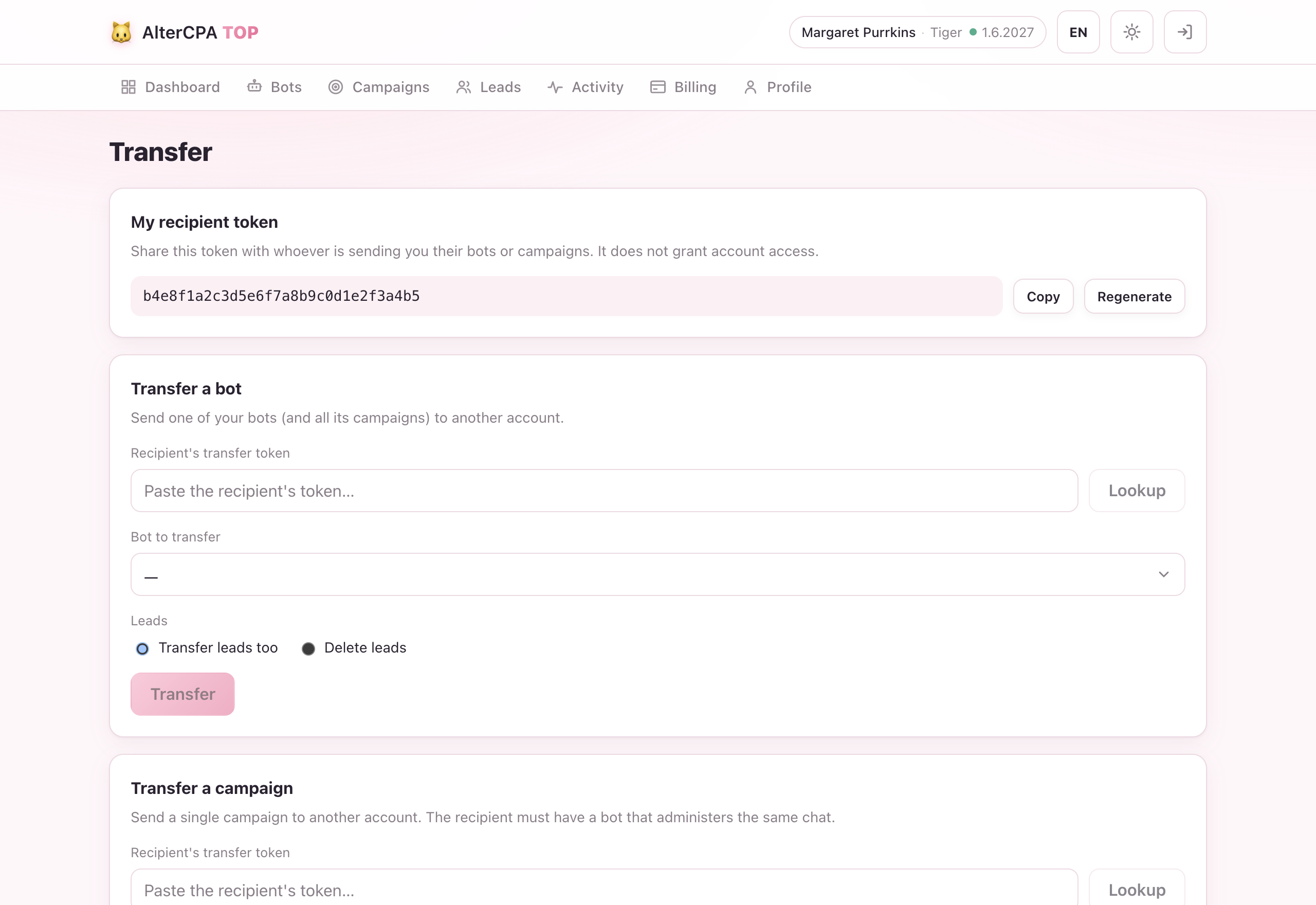
Transfers use a recipient token — a secret code that identifies a receiving account without exposing any personal details. The receiver shares this token with the sender; the sender pastes it to initiate the transfer.
The transfer is atomic: ownership changes instantly. No intermediate state.
Before you transfer: eligibility
The system checks the recipient before moving anything:
- Their plan must be active (paid, not expired).
- They must have enough free campaign slots for what you’re sending.
- For a campaign transfer: at least one of the recipient’s bots must already be admin of the tracked chat.
If any check fails you’ll see an error explaining why.
Getting your recipient token
- Open the Transfer page (footer link on Bots or Campaigns).
- Your recipient token is in the first block. Copy it and share it with whoever wants to send you something.
Your recipient token stays the same until you regenerate it. It is separate from your API key — don’t confuse the two.
Transferring a bot
A bot transfer moves the bot and all of its non-deleted campaigns to the recipient’s account.
- Open the Transfer page.
- In the Transfer a bot block, paste the recipient’s token.
- Select the bot you want to transfer.
- Choose what to do with leads: keep them (re-attributed to the new owner) or delete them.
- Confirm.
After the transfer the bot and its campaigns no longer appear in your account.
CRM goes with it. The bot’s CRM dialogs and custom-event history follow the same keep-or-delete choice as the leads, and the bot is unlinked from your operator team so the recipient can re-set-up the CRM under their own team.
Transferring a single campaign
If you only want to move one campaign (and keep the bot), use the campaign transfer.
- Open the Transfer page.
- In the Transfer a campaign block, paste the recipient’s token.
- Select the campaign.
- Choose the leads disposition (keep or delete).
- Confirm.
Prerequisite: the recipient must already have a bot that is admin of the same chat, otherwise the campaign has no bot to operate on in its new home.
A single-campaign transfer leaves the CRM dialogs with the original bot — they’re bound to it, not to the campaign.
Move a campaign between your own bots
Different from a transfer: this keeps the campaign in your account but re-points it onto another of your bots — useful when you switch which bot fronts a chat, without rebuilding the campaign.
- Open the Transfer page.
- In the Move a campaign between bots block, pick the campaign to move.
- Pick the target bot — only your bots that are already admin of the campaign’s chat are offered.
- Confirm.
The campaign’s leads and CRM dialogs move with it. The welcome media may not carry over to the new bot — if so, just re-upload it in the campaign editor. A frozen campaign can’t be moved.
You can’t transfer to yourself
A transfer needs another account’s recipient token. Pasting your own token is rejected — to move things between your own bots, use Move a campaign above.
Error reference
| Error | Meaning |
|---|---|
unpaid | The recipient’s plan has expired. They need to renew before you can transfer. |
limit | The recipient doesn’t have enough free campaign slots. They need to upgrade or free up slots. |
nobot | Campaign transfer: none of the recipient’s bots is admin of the tracked chat. |
notfound | The recipient token is invalid or doesn’t match any account. |